


sp_BLITZ™ – SQL Server Takeover Script
When people hand us a SQL Server and ask us to take it over, we need to do a fast health check. We need to put on our latex gloves, do a little poking around, and discover the dirty secrets before they catch us by surprise. That’s where our sp_Blitz™ script comes in: it helps you rapidly assess configuration, security, health, and performance issues. We organize the results in a prioritized list and give you simple explanations of each risk, plus a column of links that you can copy/paste into your browser for more information about each issue.
Step 1: Download the free sp_Blitz™ script or the sp_Blitz™ Windows app.
The Windows app is really easy. When you click that link from Internet Explorer, it’ll automatically install the app. (If you hit it from Chrome or Firefox, it may pop up in the background instead.) Run the app from your desktop (not the SQL Server console), and point it at one of your SQL Servers. It switches to TempDB, creates the sp_Blitz™ stored procedure that we’ll describe below, and then can generate a PDF output for you. It’s a self-updating app that always gets the latest sp_Blitz™ app version direct from us.
The script is a stored procedure to install on your SQL Server, and the rest of the instructions will cover that in more detail.
Step 2: Run the script on your SQL Server.
It will only take a moment to run, and that creates sp_Blitz™ in your master database. Some folks don’t like running stored procedures from master – feel free to put it in a different database instead by changing the “USE [master];” line at the top.

The first part is boring.
Step 3: Run sp_Blitz to check your SQL Server’s health.
At the bottom of the script is a sample call to sp_Blitz™ with some of the most common parameters. If you have databases with more than 10,000 tables, consider changing @CheckUserDatabaseObjects = 0 instead of 1. Execute it as shown below:
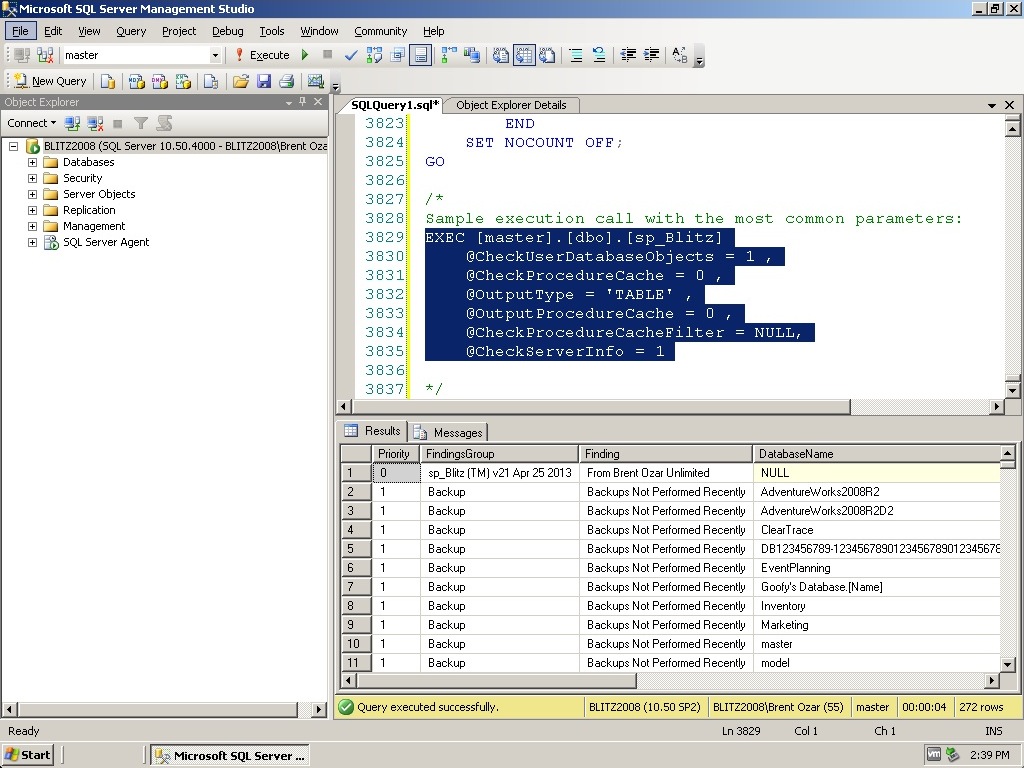
sp_Blitz™ Health Check Results
You’ll get a prioritized list of potential problems. The results go from priority 1 (urgent, like databases without backups) down to lower priority (like old compatibility levels or tables in the master database).
sp_Blitz™ usually takes 5-15 seconds to run. We work hard to make sure the queries don’t block any other end user queries, but just like any other script you get from the Internet, you should try it out in development first before you run it in production.


0 Comments:
Publicar un comentario